Introduction
Clawrium is a CLI to manage all your AI assistants. Point it at any machine on your network and deploy agents like OpenClaw with a single command.
Documentation · Issues · Roadmap · Discord
Watch: 3-minute quickstart
End-to-end walkthrough: install clawctl, register a host, deploy a Hermes agent, attach a model provider, and chat with it. Full step-by-step write-up in the Quickstart guide.
Watch: GUI walkthrough
75-second narrated tour of every tab in the web dashboard — Dashboard, Agents, Topology, Providers, Skills, Integrations, Settings. Full reference in the Web Dashboard guide.
What is an Agent?
A Clawrium agent is a general-purpose AI assistant that runs on a machine in your network. Unlike coding-specific tools, these agents are versatile assistants that can:
- Answer questions via Discord, Slack, or CLI
- Research topics and summarize findings
- Help with writing, brainstorming, and planning
- Connect to external services (GitHub, Jira, etc.)
Fully supported today:
- OpenClaw ✅ - Full-featured assistant with multi-provider and multi-channel support
- Hermes ✅ (Nous Research) - Install, configure, and OpenAI-compatible API
- ZeroClaw ✅ - Lightweight assistant for resource-constrained devices
Planned:
- IronClaw - High-performance assistant for demanding workloads
Why Clawrium?
You're running multiple AI agents across machines on your network. Without Clawrium, you SSH into each box, manage configs individually, and have no unified view of what's running where.
Clawrium gives you kubectl-style fleet control for AI agents:
- One CLI, all hosts. Add machines to your fleet and deploy any agent type to any host.
- Specialized agents. Run a fleet of purpose-built agents - a research agent, a support agent, an internal assistant - each with its own context and configuration.
- Model flexibility. Use any provider: OpenAI, Anthropic, local Ollama, or self-hosted inference.
- Lifecycle management. Upgrades, rollbacks, secrets rotation - handled from one place.
- Local web dashboard.
clawctl server startopens a visual fleet view on127.0.0.1— chat with agents, browse topology, manage providers. See the Web Dashboard guide.
How It Works
Your Machine (clawctl CLI)
    │
    ├── Host A ──> openclaw instance (Discord bot)
    ├── Host B ──> openclaw instance (internal assistant)
    └── Host C ──> zeroclaw instance (lightweight helper)
Clawrium runs from your control machine and uses SSH + Ansible to manage remote hosts.
Quick Reference
# Initialize Clawrium (check dependencies)
clawctl service init
✓ Configuration directory created at ~/.config/clawrium/
✓ Dependencies validated
# Register a host (the xclm management user must already exist on the host —
# see the Host Setup guide for one-time host preparation).
clawctl host create 192.168.1.100 --user xclm --alias homelab
Connecting to 192.168.1.100 as xclm...
✓ Connection successful
Detecting hardware capabilities...
  CPU: 4 cores (ARM64)
  Memory: 8 GB
  GPU: None
✓ Host 'homelab' added to fleet
# See your fleet status
clawctl agent get
NAME         TYPE       HOST      PROVIDER    STATUS    AGE   RUNTIME
oc-discord   openclaw   homelab   openai      running   3d    nemoclaw@v0.0.97
oc-work      openclaw   nuc-01    anthropic   running   12h   nemoclaw@v0.0.97
# Install an agent on a host (name is positional, --provider is mandatory for openclaw since v26.7.3)
clawctl agent create my-assistant --type openclaw --host homelab --provider my-provider
Installing openclaw on homelab...
✓ Dependencies installed
✓ Agent user created
✓ Configuration deployed
✓ Agent 'my-assistant' installed successfully
# Start the local web dashboard
clawctl server start
Server started at http://127.0.0.1:36000 (pid 48291)
Key Concepts
| Concept | Description |
|---|---|
| Host | A machine in your network that runs one or more agents |
| Agent | An installed AI assistant instance managed by Clawrium (e.g. OpenClaw, Hermes) |
| Agent Type | The implementation/runtime class of an agent |
| Registry | Available agent types with versions, dependencies, and templates |
What You'll Need
Before you start, make sure you have:
| Requirement | Details |
|---|---|
| Control machine | Ubuntu or macOS with Python 3.10+ |
| Target host | Ubuntu 22.04/24.04 or macOS with SSH access |
| Network | Direct connectivity between control machine and hosts |
| API keys | At least one LLM provider (OpenAI, Anthropic, etc.) |
Architecture
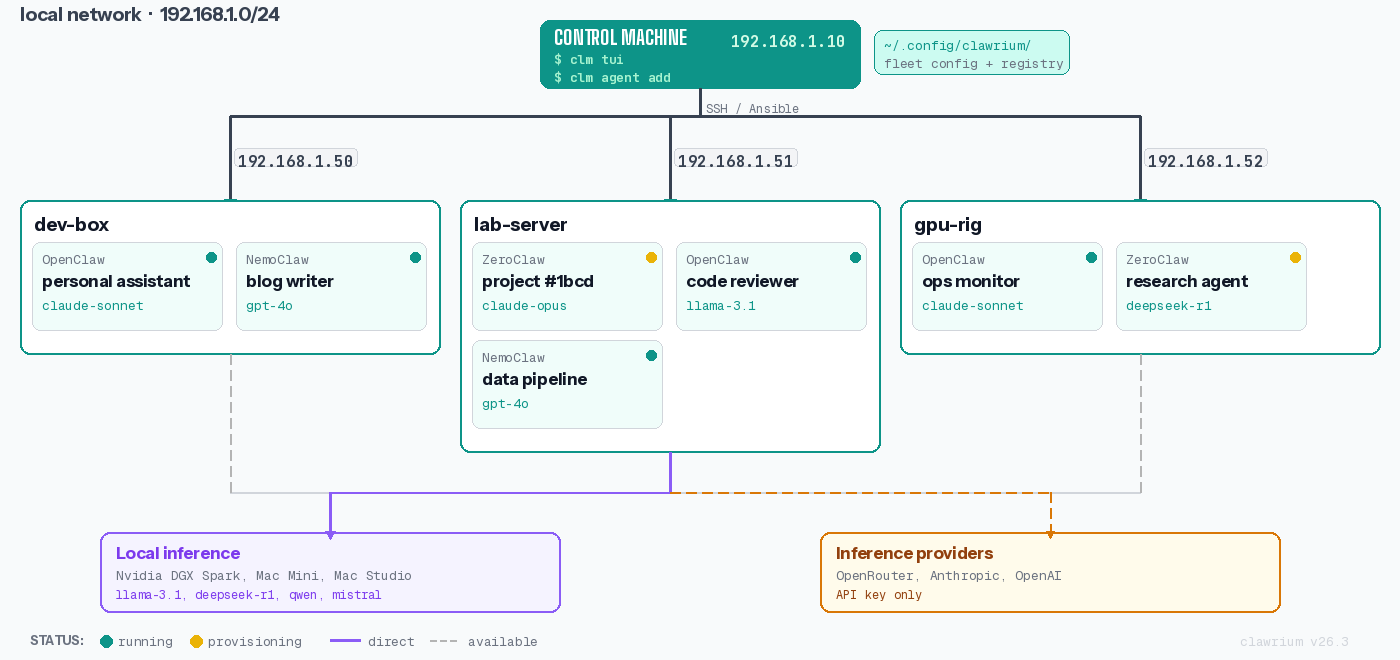
Clawrium runs from your control machine and uses SSH + Ansible to manage remote hosts from one CLI.
FAQ
What operating systems are supported?
Clawrium is tested end-to-end on Ubuntu and macOS — both as the control machine and as target hosts. On macOS hosts, enable Remote Login before registering them; see the Host Setup guide. Other Linux distributions may work but are not in the test matrix.
Which agents are supported today?
OpenClaw, Hermes, and ZeroClaw are fully supported end-to-end. IronClaw is planned. See the Support Matrix on the GitHub README for the canonical status table.
Is Claude subscription supported?
No. API keys are required by design - Clawrium manages API credentials, not subscription accounts.
Which communication channels are supported?
Discord, Slack, and CLI are supported today. Web interface is planned.
Do I need to be online?
Yes. The agents connect to LLM providers via API. Local inference with Ollama reduces external dependencies but still requires the model to be served.
Why doesn't it support my favorite agent?
Clawrium is built in spare time, so features are prioritized by maintainer use cases. Want support for a specific agent? Open an issue or send a PR.
User Data
Clawrium stores configuration in ~/.config/clawrium/:
| Path | Description |
|---|---|
hosts.json | Registered hosts and metadata |
keys/<hostname>/ | SSH keypairs for each host |
secrets/<agent-name>/ | Encrypted secrets for agent instances |
Next Steps
- Quickstart - Deploy your first agent in 5 minutes
- Installation - Install Clawrium
- Host Setup - Detailed host preparation guide
- Architecture - Understand how Clawrium works