Architecture
Clawrium manages AI agent deployments across your network through three key concepts: Hosts, Agents, and the Registry.
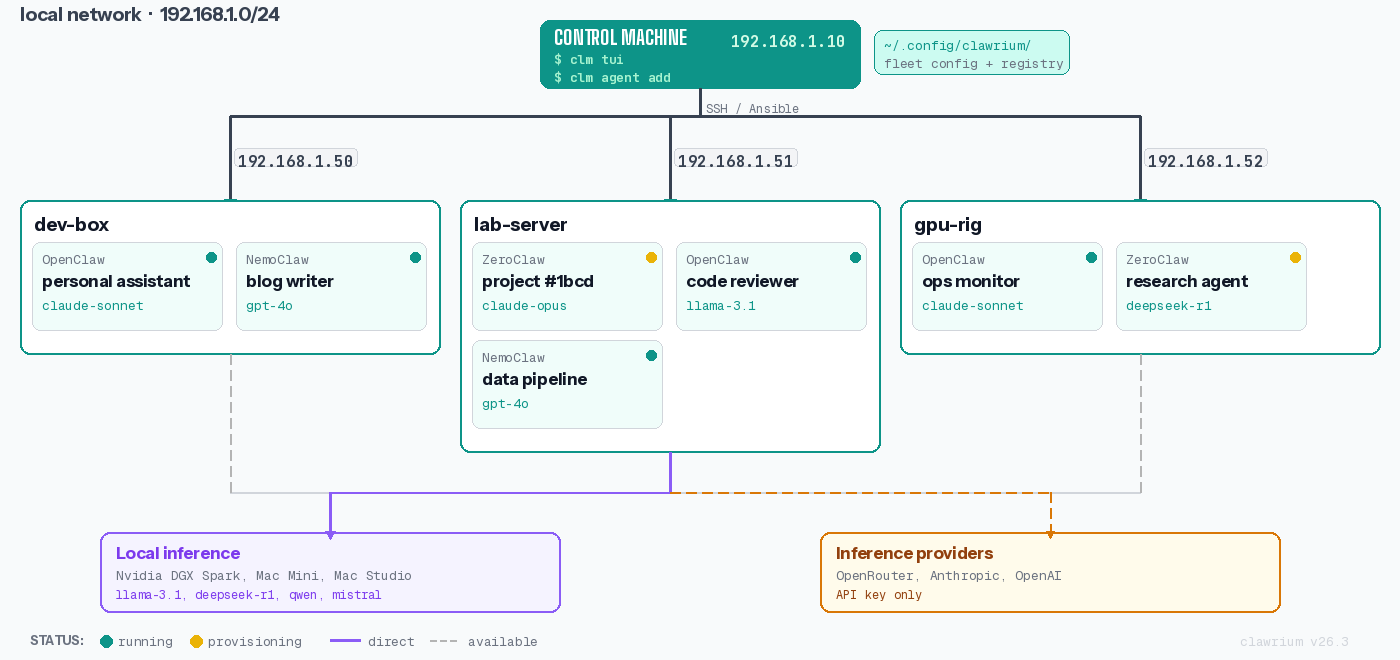
Key Concepts
Host
A Host is any machine on your network that runs one or more agents. Clawrium connects to hosts via SSH using a dedicated management user (xclm).
Characteristics:
- Direct network access required (no ProxyJump support in v1)
- Per-host SSH keypair for security isolation
- Hardware capabilities detected automatically (CPU, GPU, memory)
Agent
An Agent is an AI assistant instance.
Fully supported today:
- OpenClaw ✅
- Hermes ✅
- ZeroClaw ✅
Planned:
- IronClaw and additional agent types
Registry
The Registry defines available agent types with their versions, dependencies, and installation templates. It's the source of truth for what can be deployed.
Host Management Flow
Steps:
- First run (
clawctl host create … --user xclm): generates the per-host keypair and prints the OS-split manual setup commands with the public key embedded. - Operator runs the printed commands on the host to create
xclm, grant passwordless sudo, and drop the authorized key. - Re-run (
clawctl host create …): verifies SSH asxclm, persists the host record. - Manage: list, check status, or remove hosts as needed.
Agent Installation Flow
The installation process:
- Reads agent definition from registry
- Installs system dependencies via Ansible
- Creates unprivileged user for the agent instance
- Deploys normalized configuration (translated to agent-native format)
- Starts the agent as a systemd service
Data Storage
All user data is stored locally in ~/.config/clawrium/:
~/.config/clawrium/
├── hosts.json          # Host registry (0600 permissions)
├── secrets.json        # API keys and credentials (0600)
└── keys/
    └── <hostname>/
        ├── xclm_ed25519      # Private key (0600)
        └── xclm_ed25519.pub  # Public key
Security notes:
- Private keys are stored with
0600permissions - Each host has isolated keypairs (compromise of one doesn't affect others)
- Secrets are encrypted at rest (planned)
Network Topology
Clawrium operates on a flat network topology where the management station has direct SSH access to all hosts.
Network Requirements:
- Direct IP connectivity (no ProxyJump support in v1)
- SSH port 22 open on all hosts (or custom port with
--port) - Management station can reach all hosts
Component Interaction
The following diagram shows how Clawrium components interact during typical operations.
Component Responsibilities:
| Component | Responsibility |
|---|---|
| CLI Parser | Command parsing, argument validation, help text |
| Core Logic | Business logic, state management, orchestration |
| Ansible Runner | Executes playbooks on remote hosts |
| Config Manager | Reads/writes configuration files |
| Registry | Agent type definitions and templates |
Data Flow
Configuration to Deployment
Secret Management Flow
Security Model
Principle of Least Privilege
Each component operates with minimal required permissions:
| Component | Privileges |
|---|---|
| Clawrium CLI | User-level, reads/writes ~/.config/clawrium/ |
| xclm user | Passwordless sudo for specific commands |
| Agent instances | Unprivileged user, no sudo access |
SSH Key Isolation
Each host has a dedicated SSH keypair:
Benefits:
- Compromise of Host A's key doesn't affect Host B or C
- Easy key rotation per host
- Clear audit trail per connection